Planet Zoo 2 has no native macOS version and no announced Mac release plans as of 20 October 2026. The PC edition lists Windows requirements. A powerful Mac, or a MacBook with the same amount of memory, does not establish native compatibility.
Planet Zoo 2 is available through GeForce NOW. That is a separate cloud-gaming route to investigate; it does not mean a macOS game build has been released. This guide has no measured Mac streaming performance or verified compatibility-layer setup to promise.
Distinguish a Windows PC copy from a Mac release
The published minimum operating systems are Windows 10 and Windows 11, with Windows 11 recommended. The minimum specification includes 16 GB RAM, DirectX 12 and 40 GB available storage. Those specifications describe the Windows PC edition; matching its RAM or free space is not a Mac compatibility test.
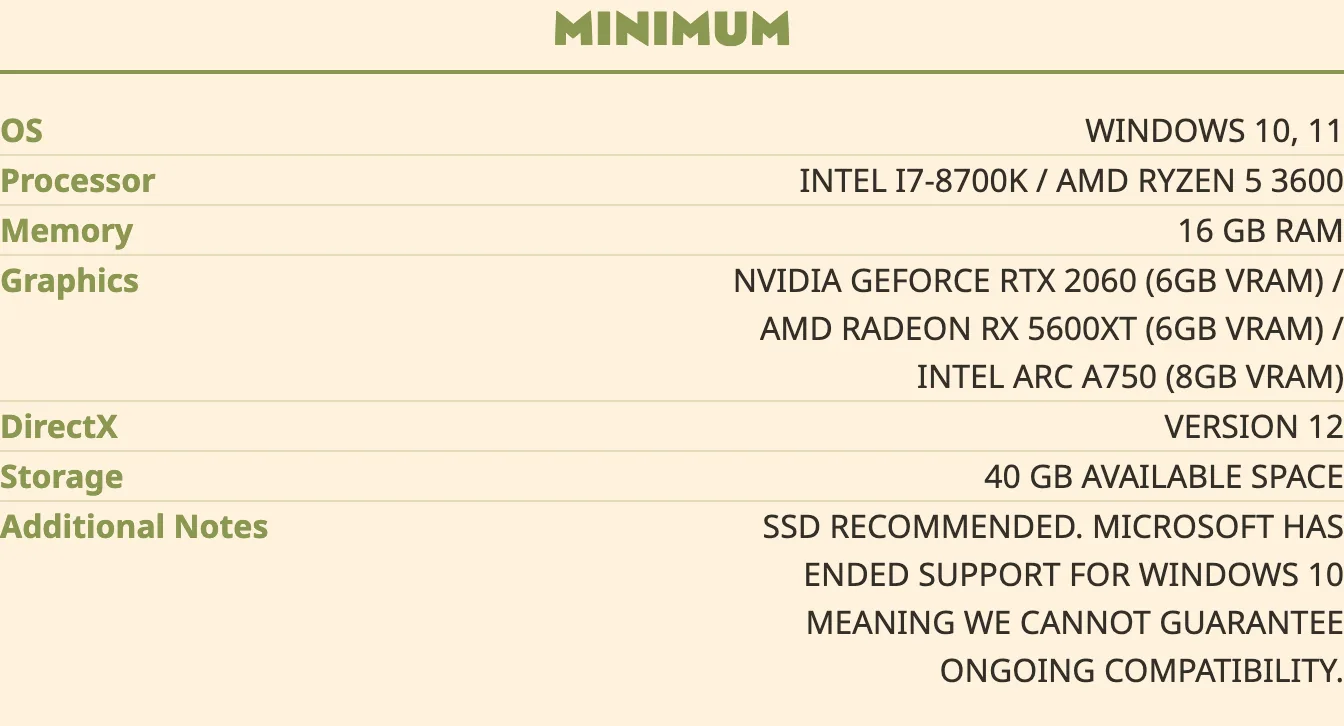
Before buying a computer copy, check the exact title and operating-system section. Instructions for the original Planet Zoo, a different game or a Windows machine do not establish that Planet Zoo 2 installs locally on macOS. There is no confirmed Mac installer, Apple-silicon requirement or native Mac release date to provide here.
Investigate GeForce NOW before spending money
GeForce NOW is the confirmed cloud service named for Planet Zoo 2. Before you purchase the game or a membership for that purpose:
- Confirm Planet Zoo 2 is available to your GeForce NOW account in your region.
- Check which game-store purchase the service accepts for that title. Do not assume every store copy or edition is interchangeable.
- Check that your particular Mac and intended app or browser meet the service's current access requirements.
- Confirm the game-ownership and membership costs separately, together with the service's connection requirements.
These are checks to complete, not a claim that every Mac, region or membership has already been validated. The available game information does not establish a cloud-client minimum macOS version, a required connection speed, membership prices, image quality or latency. Confirm those details for your setup before paying.
Local workarounds remain unverified
A Windows compatibility layer or virtual machine is a different route from both native macOS support and GeForce NOW. This guide does not have a verified Planet Zoo 2 configuration for either approach, so it cannot supply reliable installation steps, an Apple-chip compatibility list or a frame-rate target.
If you are assessing somebody else's workaround, check the exact sequel, game build and hardware used. A successful launch is not evidence that a large zoo, saving and loading, Workshop access or updates work reliably. Treat any unsupported setup as a separate compatibility question rather than an announced Mac release.
If you also own a supported console, PS5 and Xbox Series X|S provide released console versions. Choosing one of those is another hardware option; it does not make a computer-store purchase a console entitlement.