Raise Planet Zoo 2 Accreditation by earning scenario medals in Career, or by improving Zoo Reputation and Wildlife Reserve Biodiversity in Franchise. Open the Planet Hub and inspect Accreditation to see what the next tier requires in the mode you are playing. Career progress does not advance your Franchise tier.
Higher tiers expand access to species in Trading, marketing options, Research Network types and animal storage. If a favorite animal is locked, start with its tier requirement rather than building an enclosure first. A tier unlock and an available listing in the online market are separate things.
Find the requirement that actually blocks you
- Enter the Career campaign or Franchise you want to progress.
- Open Planet Hub using the world icon.
- Select Accreditation and inspect the next tier’s requirements.
- Match each requirement to the relevant scenario medal, zoo or Wildlife Reserve.
- Work on an unmet requirement, then return to the same panel to check progress.
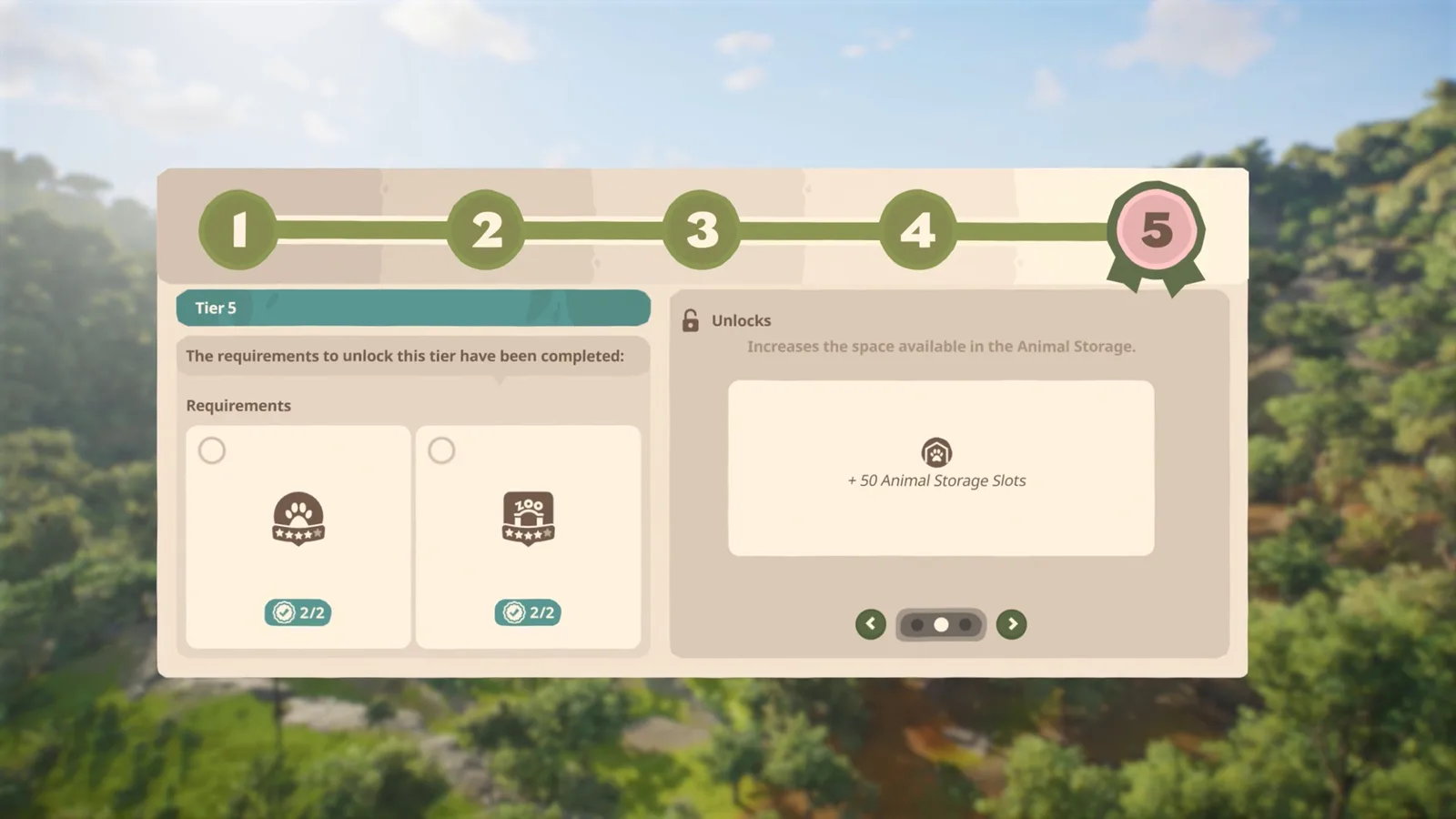
Requirements and unlocks appear in separate parts of the Accreditation panel.
Read the requirement in your current game before committing to a long rebuild. A zoo’s Reputation stars, a reserve’s Biodiversity stars and the network’s Accreditation tier measure different things. A strong rating at one location does not mean every requirement for the next tier has been completed.
The mode matters as much as the rating. If you have played Career for several hours and then start a Franchise, the Career medals are not a shortcut through Franchise progression. Stay in the Franchise you want to improve and check the locations shown in its own Hub.
| What you are looking at | What it tells you | Where to focus |
|---|---|---|
| Career scenario medals | Progress through scenario objectives | The next unfinished medal objectives |
| Zoo Reputation | The performance of an individual zoo | The zoo’s current rating and its breakdown |
| Reserve Biodiversity Rating | The performance of a Wildlife Reserve | Its ecosystems and research progress |
| Accreditation tier | Your progression and unlocked options | All requirements listed for the next tier |
What a higher tier opens
Accreditation changes several systems, so check the unlocks attached to the tier you are pursuing:
- Species in Trading: progression can make additional animals accessible. You still need an available offer and a suitable home.
- Marketing: higher Accreditation opens improved marketing options. The tier unlock gives you access to an option; it is not a promise of a particular income increase.
- Research Networks: new network types expand the research options available as you develop reserves.
- Animal storage: increased capacity gives you more room for animals waiting to move into their destination.
Choose your next project around the unlock you actually need. If your immediate aim is a species, read that animal’s access requirement before building around it. If you are developing a reserve, inspect the relevant research options instead. These are reasons to advance Accreditation, but none replaces the next tier’s listed conditions.
Advance Career Accreditation through medals
Career awards Bronze, Silver and Gold medals for completing scenario objectives in zoos and Wildlife Reserves. Those medals are the progression route for Career Accreditation.
Open the active objectives and identify the next incomplete task. Keep the requested outcome in view: a scenario may direct you toward an animal, a reserve activity or another management task. Complete the objective shown for that location before assuming that extra decoration or a larger cash balance will move the campaign forward.
You can select individual tasks to reach the relevant menu or location. This is especially useful when a scenario shifts attention between different parts of the campaign. Follow the active instructions instead of applying a generic Franchise build order to every Career map.
When you reach a medal, return to the Accreditation panel and compare the updated progress with the next requirement. Do not assume that every scenario must reach Gold before you can do anything else. The panel’s medal requirements are the useful target; a universal rule to finish every location completely would send you toward work your next tier may not require.
For the campaign’s starting steps and the scenario problems addressed in the current patch, use the Career Mode guide.
Improve the Franchise locations that count
Franchise Accreditation depends on the performance of the zoos and Wildlife Reserves in that Franchise. Begin with the specific unmet requirement shown in its Accreditation panel. If it asks for a zoo rating, improve the qualifying zoo; if a reserve rating is missing, switch to that reserve rather than adding more unrelated exhibits to an already successful zoo.
Work from the current Zoo Reputation
Zoo Reputation appears on the zoo’s bottom status bar. Inspect its breakdown before adding another habitat. The rating reflects how the zoo operates, including animal care and visitor education, so a profitable zoo can still have a different weakness to address.
Use this inspection order to choose a useful change:
- Check the rating and the area currently limiting it.
- Inspect the relevant animals or guest needs rather than guessing from the entrance’s appearance.
- Make an improvement that addresses the problem you found.
- Let the zoo operate and check the same rating again.
- Reopen Accreditation to see whether its requirement is now satisfied.
For an animal care problem, inspect welfare and the actual unmet need. The animal information panel and pinned species information help distinguish space, habitat conditions, social needs or enrichment. Improve the existing habitat to match what the animal needs; adding a different species elsewhere is not the same action.
For education, check whether visitors have useful information near the places they visit. Education boards, speakers and animal talks are available through the education section of the Facilities browser. Choose the tool that fits the route and habitat you are improving. There is no universal number of boards or talks that guarantees a particular Accreditation tier.
Improve reserve Biodiversity separately
A Wildlife Reserve has its own Biodiversity Rating. It is not the same value as the Reputation of the zoo that supplied its animals. Reserve progression involves establishing appropriate ecosystems and research, so inspect the reserve itself when its rating is the missing requirement.
The basic reserve sequence is to establish a Research Outpost, prepare the environment and assemble a suitable release group. Research Networks then support observation of the animals. As ecosystems and research improve, the reserve’s Biodiversity Rating can improve too.
Use the reserve’s current conditions and the release group’s requirements to decide the next action. Releasing another animal without checking whether the ecosystem can support it is not a reliable rating plan. Detailed release preparation belongs in the Wildlife Reserve release guide.
Separate a locked species from an empty market
If the species is marked as requiring a higher Accreditation tier, compare that requirement with your mode’s current tier. Work on the missing progression condition first.
If the tier requirement is already met but Animal Trading has no suitable listing, investigate market availability separately. Franchise uses an online trading market. Refreshing listings does not earn medals or improve the ratings on your Accreditation checklist; a higher tier does not guarantee that a particular animal is listed at that moment.
Also distinguish a tier gate from an edition access problem. Update 1.0.5 corrected the Zoopedia incorrectly marking DLC animals as inaccessible for DLC owners. That fix does not turn every missing listing into an Accreditation bug, and it does not add content that your account does not own.
Before changing your zoo, record the exact condition you see:
- A named species explicitly locked behind a tier.
- A requirement still incomplete in Accreditation.
- A qualifying requirement that appears complete but has not registered.
- An accessible species without a current trading offer.
- A content ownership warning rather than a progression warning.
Each leads to a different next step. Keeping them separate can save a working zoo from an unnecessary rebuild.
When a completed requirement does not register
Check the correct mode and Franchise first. Then compare the live rating with the requirement currently displayed in Accreditation. A previous rating, a different zoo’s screenshot or a medal from another mode does not establish that the condition is met now.
Check your installed update before repeating the attempt. The reviewed 1.0.5 notes include Franchise loading stability work and a correction to inspection reports that displayed four stars when all aspects were rated five. The notes do not state that every Accreditation registration problem has been fixed.
If the panel still disagrees with a visibly satisfied requirement, capture both states. Include the current game version, platform, mode, affected location, rating and the exact requirement that remains incomplete. A repeatable mismatch is more useful for an issue report than a general statement that animals are locked.
Keep your functioning habitats and reserve conditions intact while documenting the problem. There is no verified reset procedure here that requires demolishing a zoo, spending all your Conservation Credits or restarting the entire campaign.