Start Planet Zoo 2 Career Mode through Career → Start New Career +, read Eric Ashford’s welcome letter, then choose Chapter 1’s first location and Travel to Wildlife Reserve. You join FEN as a Conservation Coordinator, working across connected zoos and Wildlife Reserves. Complete each location’s objectives to earn Bronze, Silver and Gold medals and advance Career Accreditation.
The campaign alternates between conservation and zoo management. Follow the active task for the location you are visiting rather than treating every map as an empty zoo to rebuild. If progress appears stuck, check the task, the required medal and your installed update before restarting the campaign.
Start the campaign and find your next task
- Select Career from the main menu.
- Choose Start New Career +.
- Read Eric Ashford’s welcome letter.
- Select the first location in Chapter 1.
- Choose Travel to Wildlife Reserve to enter the opening location.
- Read the active objectives before placing, moving or deleting anything.
The first reserve introduces observation and animal photography before the campaign moves into hands-on zoo tasks. Later locations teach different parts of running a zoo and restoring a reserve. The active instructions are more useful than importing a build order from an older Planet Zoo scenario.
Use the objective panel to identify what is actually incomplete. Selecting a specific task can take you to the relevant menu or zoo location. This is helpful when the instruction concerns an animal or a facility that is already present, rather than something you need to buy.
Follow medals across the campaign network
Career medals are earned from the objectives in scenario zoos and Wildlife Reserves. They also raise Career Accreditation, which expands your progression options.
After completing a medal’s objectives, inspect the next available task and the next Accreditation requirement. Use the Planet Hub to travel between accessible locations. You do not need to assume that finishing every Gold objective in one place is the only way forward: some later work involves moving through the network and returning to an earlier zoo.
A useful way to keep track of the campaign is to note three things when you leave a location:
- The medal already earned there.
- The next unfinished objective.
- Any requirement that depends on further campaign progress.
When you return, read the current task again. A habitat you built for an earlier objective may already be suitable for the next stage; another task may require a particular animal, a management change or reserve work elsewhere.
Career progress belongs to Career
Career and Franchise Accreditation are separate. You can use Career to learn the tools before opening a Franchise, but Career medals will not raise that Franchise’s tier.
If your reason for playing the campaign is to obtain an animal in Franchise, check the Franchise requirements first. Continue Career for its scenarios and learning progression, rather than expecting the medal screen to unlock an unrelated Franchise market. The Accreditation guide explains how to identify the requirement in the correct mode.
Recognize the opening scenario tasks
The campaign teaches systems by asking you to complete concrete outcomes. The overview below helps identify the kind of action to take; use the active objective for the exact quantity, species setting or value in your save.
| Location | Tasks introduced | What to inspect when progress pauses |
|---|---|---|
| Great Rift Valley reserve | Observation, animal photography and reserve work | The animal or reserve action requested by the active objective |
| East Africa zoo | Animal information, habitat care, aviary construction and a giraffe release group | Whether the specified animal or facility meets the current task |
| Nordic Fjords | Exhibits, aquarium access, filtration, power and aquatic animal care | The connected system, not just the building’s appearance |
| Southeast Wales | Quarantine, a Tree-Kangaroo habitat, education, guest facilities and staff tasks | The requested animal, education topic or management outcome |
| New England | Donations, shops, marketing, species variety and repaying a loan | The current financial or animal objective before further spending |
These locations do not all ask you to solve the same problem. A reserve observation task is different from a zoo welfare target, and an aquarium’s connected filtration system is different from the presence of a filter somewhere on the map.
East Africa: follow the release-group task
The early zoo section introduces animal inspection and practical habitat work before moving into conservation. Read the task attached to the giraffe release carefully. Creating the intended release group and using a generic quick-release action are different operations.
This distinction also matters for an older save affected by the Great Rift Valley progression problem. Update 1.0.5 disabled Quick Release for the relevant giraffes because using it removed them from storage and prevented them from being placed. Check the current objective and the intended group workflow rather than disposing of the required animals while trying to move the task forward.
Nordic Fjords: check the whole aquarium chain
The Nordic Fjords introduction links an aquarium staff gate, filtration, salinity, power and temperature with adopting aquatic animals. If the aquarium looks complete but the task has not advanced, return to the exact setting the objective asks you to change.
A placed filtration facility still needs the required connection, and the facility needs power. Adding an animal does not correct an unfinished infrastructure task. Check these elements in the order shown by the objective instead of buying extra equipment without knowing which condition is missing.
Use the water filtration troubleshooting guide for a water-quality problem that continues after the scenario’s requested setup is complete.
Wales and New England: act on the target
Later introductory work shifts toward education, visitors, staff and finances. Read whether a task asks you to place a named item, set its content, train a staff member or improve an outcome. Those are different completion conditions.
For an education task, inspect both the placed board or speaker and the selected species or topic. For an animal welfare objective, inspect the animals that are actually lowering the zoo’s average. For a finance objective, check the requested campaign, shop or loan action before creating another expensive habitat.
Treat any required number as local to the current task. A guest or welfare target shown in one scenario is not a universal recipe for every zoo, and a video’s visible cash balance is not the amount your own save must have.
Use the Planet Hub when objectives change location
The Planet Hub is the campaign’s location switcher. It lets you return to accessible zoos and Wildlife Reserves and review the wider network, including research and conservation projects.
Open the Hub when a task directs you elsewhere or after a medal opens more work. Choose the location tied to the task you want to complete. Moving between locations is part of managing the campaign network, so an unfinished higher medal at the current zoo does not by itself mean the campaign is broken.
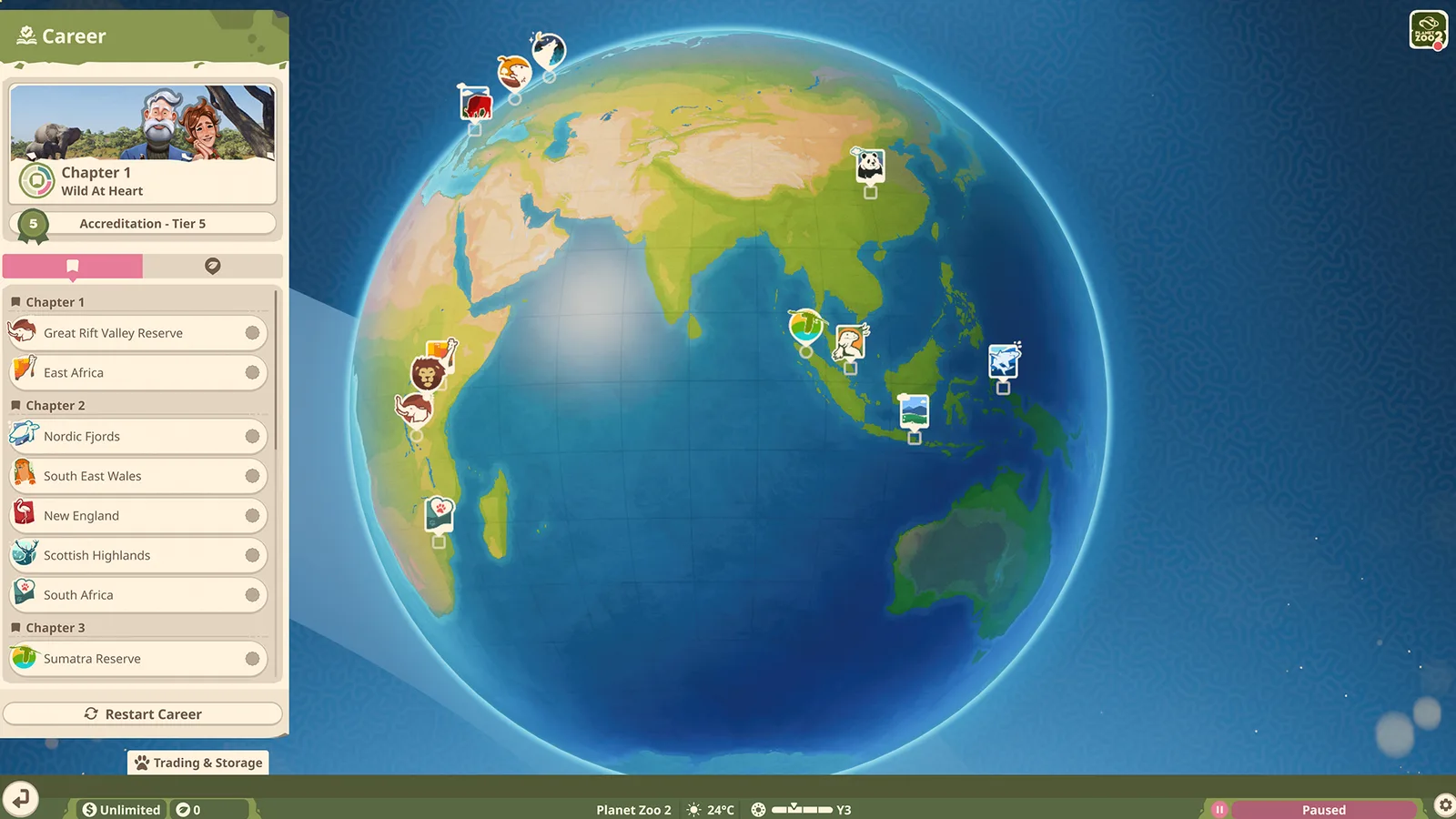
Use the location list to choose an accessible Career scenario.
Before changing location, keep the current objective’s wording in mind. When a task asks for a result at a named reserve, constructing more facilities in the zoo you are leaving will not satisfy that reserve task.
Check the scenario fixes in update 1.0.5
The reviewed update notes are dated 16 October 2026. They identify specific Career softlocks and related corrections. Check your installed version before retrying an affected objective.
| Affected situation | Change recorded in 1.0.5 | Useful next check |
|---|---|---|
| Moon Jelly Exhibit deleted before the relevant Nordic Fjords task | The exhibit was added as a placeable item to address the softlock | Check the current task and the item available to place |
| Giraffes quick-released during Great Rift Valley progression | Quick Release was disabled for those giraffes | Follow the intended storage and placement task |
| Animal Trading opened while Alys discussed adopting a Shoebill in East Africa | The resulting softlock was fixed | Retry the task on the installed update |
| Boxed animals appearing when loading Sumatra Reserve | The loading issue was corrected | Reopen the location and inspect the affected animals |
| Career notifications remaining on the main menu | Incorrect notifications after certain objectives were fixed | Distinguish a stale notice from the active scenario’s task |
The notes also correct adult Career animals sometimes being identified as juveniles. If an objective involves an animal’s status, inspect the current animal panel rather than relying on a screenshot taken before updating.
A patch note describes the problem addressed; it does not guarantee recovery of every previously affected save. If an objective remains blocked, record the scenario, active task, game version, platform and the sequence that reproduces the problem. Include what the task expects and what the game currently does.
Continue a Career zoo in Sandbox
Career zoos can be continued in Sandbox when the option is available in your campaign. This provides a way to keep building beyond the scenario objectives. It is a separate use of the location from earning the next Career medal.
Update 1.0.5 corrected Terrain Only not functioning when exporting a Career scenario to Sandbox. If your goal is to reuse the landscape, inspect that export option on your installed version rather than expecting a full scenario export and a terrain-only export to contain the same things.
For creating a new landscape from biome, continent and terrain options, use the maps page. It separates new zoo creation from reserve selection and Career terrain.